A friend-of-the-list asks:
“I have a gardening client that runs Easter promotions. Last year, I made the mistake of changing headlines in my RSAs during Easter.
It was a ton of work and it took Google hours to get the ads reviewed, which obviously cost a lot of impressions.
How do you add promotions to your text ads?”
There are multiple ways to skin a cat, but I like to use Headline and Description Assets.
Headlines and Descriptions in the Assets tab are great for adding temporary promotions to your RSAs (e.g., Easter offers).
Instead of changing all your individual RSAs in different ad groups in different campaigns, you can simply use Campaign Level Headlines (and Descriptions).
Here’s how I use it:
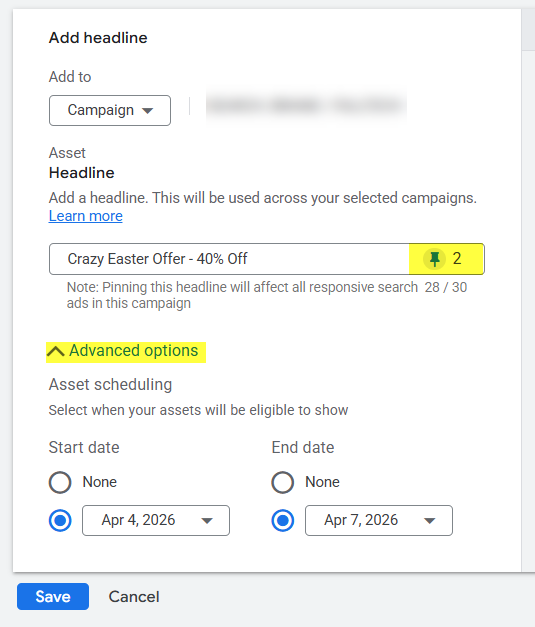
- Create Easter headlines via Assets tab (e.g., “Crazy Easter Offer,” “40% Off with Code EASTEREGG”)
- Pin the headlines to Headline 1 and Headline 2
- Set a Start date and End date for the Headlines (and yes, you can schedule these assets, which is great)
- Select the Headline in the Asset view, and Add it to all the campaigns I want to apply it to
I hope this helps some of us prep some eggs this weekend! 🙂
– Nils
PS: Wednesday is ‘Ask Me Anything’ day. If you’ve got a question to which my answer would benefit a larger part of the community, send it my way, and I’ll try to answer it. 🙂