I don’t do fancy reporting.
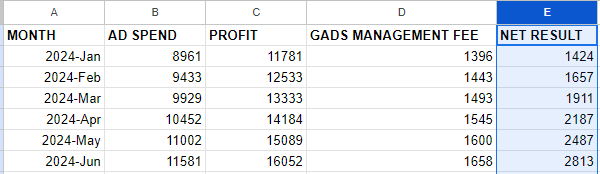
In the end, there are only 4 numbers that really matter:
1. Google Ad Spend
2. Gross Profit (from Google Ad Spend)
3. my Google Ads Management Fee
4. your Net Result ( ‘net result’ = ‘profit’ – ‘ad spend’ – ‘management fee’)
Here’s what that looks like:
And here’s how I automate that via Google Ads Scripts:
➥ ACTION: Schedule this script to run monthly on the first day of the month.
(Don’t worry if you have never run a script before. You do not need any coding skills. It is as simple as copy-paste.)
INSTRUCTIONS:
-
- See the script code below. Install the script in your account.
Don’t worry if you have never done this before. You do not need any coding skills. It is as simple as copy-paste. Simply follow these instructions on how to set up and schedule Google Ads scripts. - Create a new Google Sheet
(tip for Chrome users: simply type ‘sheets.new’ in the address bar) - Add the complete URL of the spreadsheet to SPREADSHEET_URL variable
- Add your MANAGEMENT_FEE_BASE and MANAGEMENT_FEE_PERCENTAGE
- Add your PROFIT_MARGIN
- Preview
- Schedule to run monthly on the first day of the month
- See the script code below. Install the script in your account.
/**
* Nils Rooijmans' Monthly Reporting Script (MOST BASIC FREE VERSION)
*
* contact nils@nilsrooijmans.com for the paid version that allows for
* - MCC version for manager accounts, with email settings per client
* - excluding brand campaigns
* - reporting deltas
* - graphing result over time
* - email report url and/or PDF to team members/client every month
* - option to report on conversions by time of conversion
*
**/

// Configuration variables
const SPREADSHEET_URL = 'insert_new_spreadsheet_url'; // create new spreadsheet and insert url here
const MANAGEMENT_FEE_BASE = 500; // set your base fee
const MANAGEMENT_FEE_PERCENTAGE = 0.1; // 10% of ad spend, set to 0 if you charge a flat fee
const PROFIT_MARGIN = 0.3; // 30%, set to 1 if your primary converion actions are tracking profit instead of revenue


// Main function to run the script
function main() {
    const results = getLastMonthResults();
    addResultsToSheet(results.adSpend, results.profit);
}

// Function to get the last month's ad spend and profit
function getLastMonthResults() {
    // Define the GAQL query
    const query = `
        SELECT
            segments.month,
            metrics.cost_micros,
            metrics.conversions_value
        FROM
            customer
        WHERE
            segments.date DURING LAST_MONTH
    `;

    // Execute the GAQL query and fetch results
    const results = AdsApp.report(query).rows();

    // Extract the ad spend and profit from the results
    let adSpendMicros = 0;
    let revenue = 0;
    for (const row of results) {
        adSpendMicros += row['metrics.cost_micros'];
        revenue += row['metrics.conversions_value'];
    }

    let profit = revenue * PROFIT_MARGIN;

    // Convert ad spend from micros to standard currency
    const adSpend = adSpendMicros / 1e6;

    return {
        adSpend: adSpend,
        profit: profit
    };
}

// Function to add results to the Google Sheet
function addResultsToSheet(adSpend, profit) {
    const sheet = SpreadsheetApp.openByUrl(SPREADSHEET_URL).getActiveSheet();

    // Calculate the management fee and net result
    const managementFee = adSpend * MANAGEMENT_FEE_PERCENTAGE + MANAGEMENT_FEE_BASE;
    const netResult = profit - adSpend - managementFee;

    const month = getLastMonth();

    // Append the new row to the sheet
    sheet.appendRow([month, adSpend, profit, managementFee, netResult]);
}


function getLastMonth() {
    const today = new Date();
    const monthNames = ["Jan", "Feb", "Mar", "Apr", "May", "Jun", "Jul", "Aug", "Sep", "Oct", "Nov", "Dec"];

    // Get the year and month for the previous month
    let year = today.getFullYear();
    let month = today.getMonth(); // January is 0, December is 11

    // Adjust the year and month if the current month is January
    if (month === 0) {
        month = 11; // December
        year -= 1;
    } else {
        month -= 1;
    }

    // Get the month name from the array
    const monthName = monthNames[month];

    return year + '-' + monthName;
}

Love this script!
Thanks Nils!! I love this script and find it very useful
ᴎils rooijmans
2024-06-02T12:21:41+00:00
Javier Ruíz-Calderón, PPC Manager at Selecta - Madrid, Spain
https://nilsrooijmans.com/testimonials/love-this-script/
0
ᴎils rooijmans
Join thousands of PPC geeks who already have access:
If the button above isn’t working for you, you can sign up here to get access.