If you are running my Google Ads Script to detect products that have been disapproved in Google’s Merchant Center, you may have noticed an increase in products that falsely get disapproved because of ‘Product page unavailable’.
Your product pages are working fine, but Google says otherwise.
The problem is often NOT your website. It’s Google. Google has trouble with the DNS lookup or other unknown crawling issues that resolve themselves on the next crawl.
This issue is annoying, but don’t worry if this only happens to a small fraction of your products that do not get a lot of clicks and conversions. The product will get approved during the next crawl, and your Google Ads performance won’t suffer that much.
HOWEVER, when products get disapproved that have generated a significant amount of clicks and conversions, you want to get them approved ASAP.
This is not only because you want these products to show in your ads again to generate clicks and conversions, but also because of potential risks for offsetting the smart bidding algorithms. (Yes, Google will most certainly continue to spend your $$$, just now on clicks for products with lower conversion rates and lower conversion value.)
When products that have generated a significant amount of clicks and conversions get disapproved because of ‘Product page unavailable’, here’s what to do:
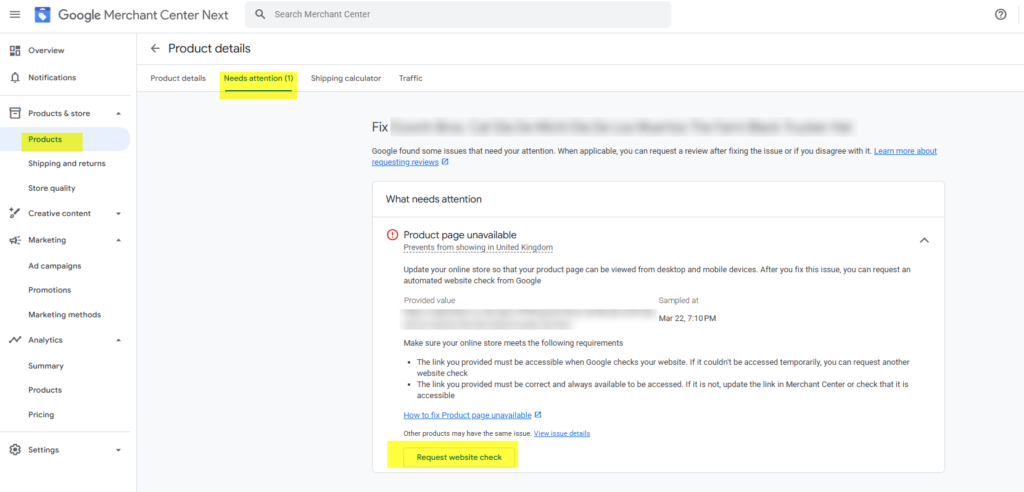
1. Head over to Merchant Center
2. In the left navigation, click Products
3. Click the ‘Needs attention’ tab
4. Click ‘View products’ in the ‘Product page unavailable’ card
5. Click on one product
6. In the top right corner, under Status, click ‘Review and fix’
7. On the Products detail page, click on ‘Request website check’
This should fix the issue within 24 hours (unless, of course, it truly was an issue with your website).
I hope this helps!
– Nils