Google Ads Editor can be a huge time-saver when managing Google Ads accounts. I cannot live without it and use it for many account editing tasks.
Copy-pasting Audiences between campaigns is one example that would take forever in the Google Ads UI. However, there’s a catch.
You would expect that the associated settings of an Audience would be copied, right? Not so.
Here’s the thing: when you copy an Audience with a targeting setting of ‘Observation’ and paste it into another campaign, the setting will automatically switch to ‘Targeting’ if that is your default campaign setting. See below:
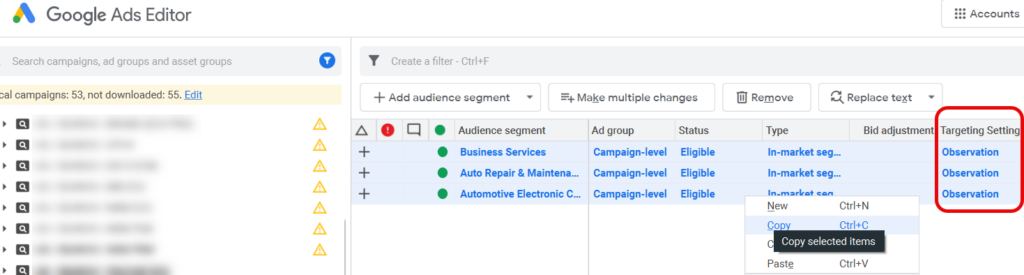
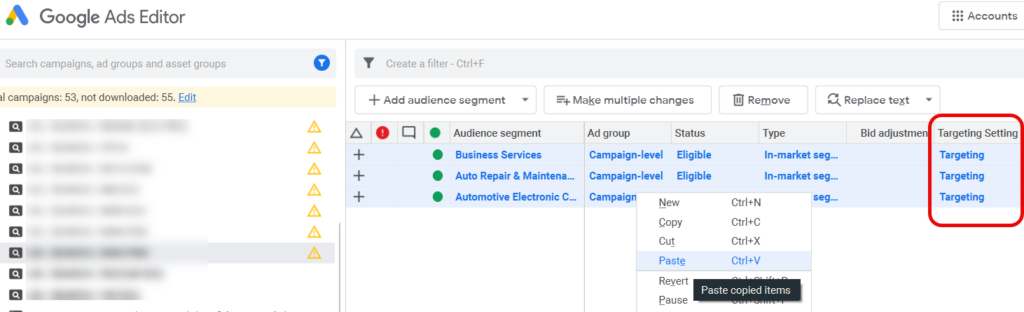
As you know, adding an Audience to a campaign with the Targeting Setting set to ‘Targeting’ narrows the reach of your ads to the specific Audience. Not good, when you just want to “observe” the performance of the Audience and/or provide it as a signal to Google without dramatically impacting your reach!
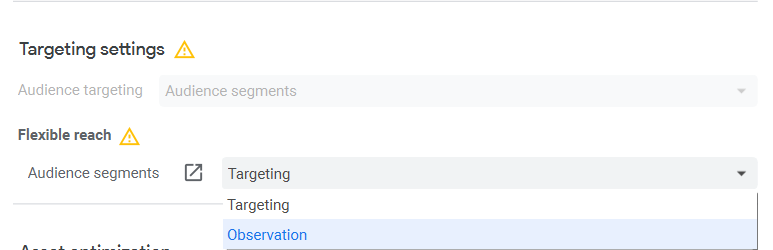
To fix this copy-paste issue in Editor, click into the Campaign (and/or Ad group) and change the ‘Flexible reach’ setting:
I hope this helps!
– Nils